


SlateHQ (the product is called Slate) is an AI search and SEO platform that tracks how your brand shows up in AI answers and Google, then turns what it finds into work through workflows, recipes and bulk "sheets". Plans run from $499 to $2,000 a month, with 1:1 onboarding included from the $999 Scale plan upwards[1].
Best features: transparent AI reasoning you can audit step by step, a workflow, recipe and sheets layer that speeds up repeatable content work, a credit model that is easy to read, and a broader set of integrations than I expected.
Biggest limitations: the platform takes real effort to configure, the dashboards show a few inconsistent numbers, and the off-site promise on the homepage, building your presence beyond your own site, is not built out yet.
Verdict: I tested SlateHQ on our own website during a 14-day trial, and it is the most complete agency-friendly alternative to AirOps and Profound I have used so far. Both of those are now funded to serve enterprise marketing teams, while SlateHQ publishes its prices and sells a dedicated Agency plan. Budget for the time it takes to set up properly, and SlateHQ can take hours out of a content team's week.
What you get
SlateHQ bundles five things that usually sit in separate tools. Its homepage groups them as Analyze (page performance and an AI Visibility Tracker), Automate (workflows, super blocks, actions and agents), Collaborate (Cowork, an AI agent workspace), Manage (Power Sheets and a brand kit) and an MCP server for working from AI assistants[2].
| Plan | Price | Credits | AI answers a month | Pages monitored | Onboarding |
|---|---|---|---|---|---|
| Growth | $499/mo | 15,000 | 10,000 | 1,000 | Live chat support |
| Scale | $999/mo | 50,000 | 20,000 | 5,000 | 1:1 expert onboarding, dedicated account manager |
| Agency | $2,000/mo | 100,000 | 50,000 | 10,000 | 1:1 expert onboarding, dedicated account manager |
| Enterprise | Custom | Custom | Custom | Custom | Custom |
Annual billing takes 20% off, and every plan includes a bring-your-own-API-key option[1]. Credits pay for agents, recipes, workflows and content, while AI answers cover visibility tracking across ChatGPT, Perplexity, Google AI Overviews and AI Mode.
How I tested it
I ran SlateHQ on the Scale plan for Generate More, an AEO agency and fractional CMO practice. Search Console and Google Analytics 4 were connected on day one, along with 44 tracked keywords and ten AI prompts about AEO agencies and AI search tools.
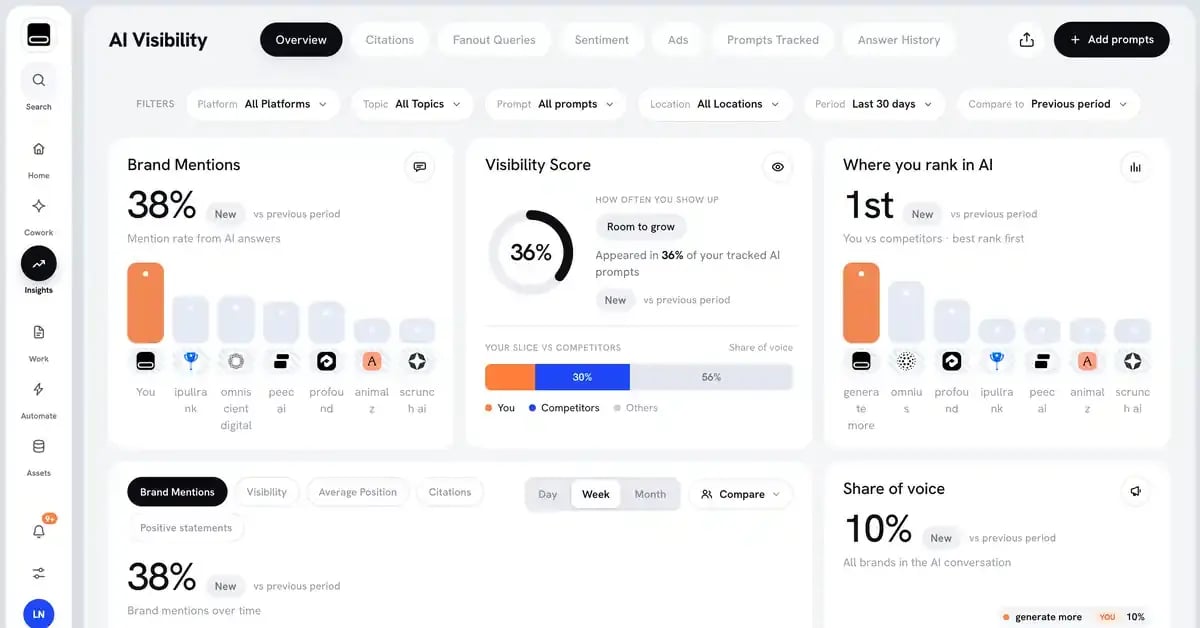
My goal was specific. I wanted to see whether SlateHQ could run our own listicle-to-mention loop end to end: find the third-party pages AI engines cite for "best AEO agency" prompts, identify who wrote them, and prepare outreach. Along the way I also ran a full content refresh of one of our tool reviews and built a custom workflow from scratch.
Over eight days the account used 3,301 of its 50,000 credits.
What SlateHQ does well
You can see how the AI reached its answer
Most AI tools hand you an output and ask you to trust it. SlateHQ shows the work. Every task its agent creates on its own carries a written reason that points back to the instruction it came from, in our case a dated correction to the brand mandate. Workflow runs keep a log for each step with the exact input and output, so when a result looked wrong I could open the step and see what the model had received.
The agent also keeps a "Mind": a set of memory files, scheduled routines (a morning triage, a deep-work window, a weekly report) and an approval queue, where every write action waits for a person to approve it. For an agency that has to explain its work to a client, that audit trail matters more than any single visibility score.
Workflows, recipes and sheets speed up repeatable work
The automation layer is where SlateHQ earns its price. The workflow builder has around 50 blocks, including an LLM step, Google Search, AI Overview extraction, an LLM Search block that runs one prompt across several AI engines and returns citations as JSON, web scraping, Semrush and Ahrefs data, and publishing to Webflow and WordPress. Sixteen ready-made super blocks cover most of a content workflow, from brief to fact-check, internal links, schema and FAQs.
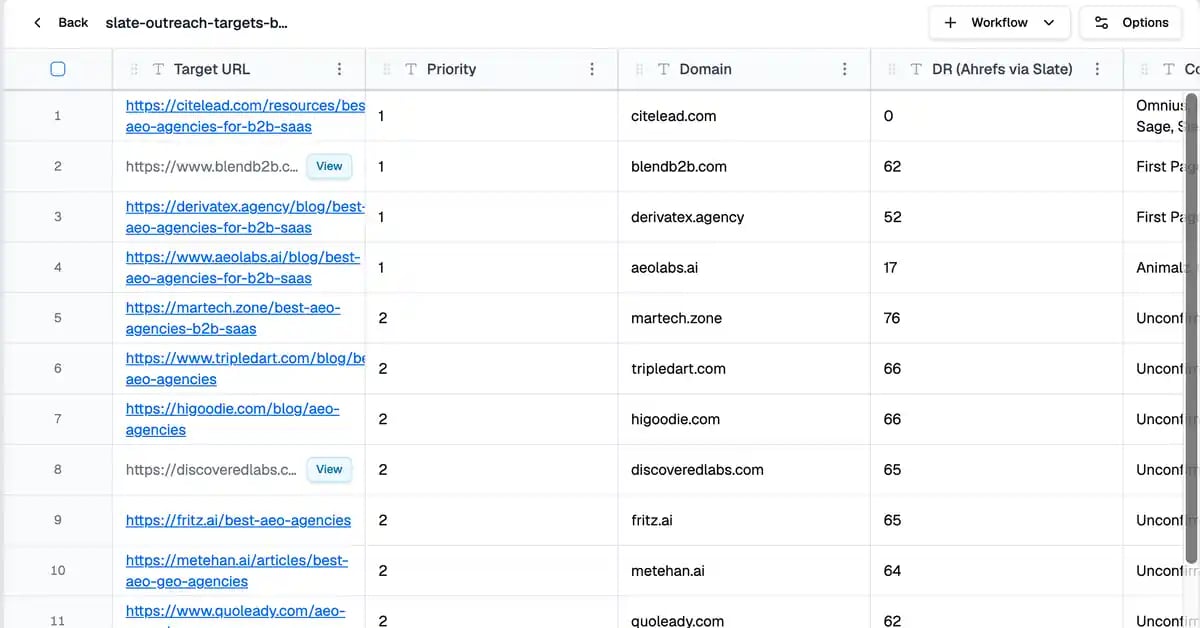
Two runs stood out. A full content refresh of one of our reviews took 10 minutes 25 seconds and produced a refresh plan built on a diagnosis of the page and its competitors. The "Find AI Citation Gaps" recipe then found 24 third-party pages that ChatGPT and Perplexity cite for AEO agency prompts and that do not mention Generate More, each scored by domain rating, in 2 minutes 41 seconds. Only one of the five agency lists I had picked by hand for outreach was on it. That single result changed which sites I would pitch.
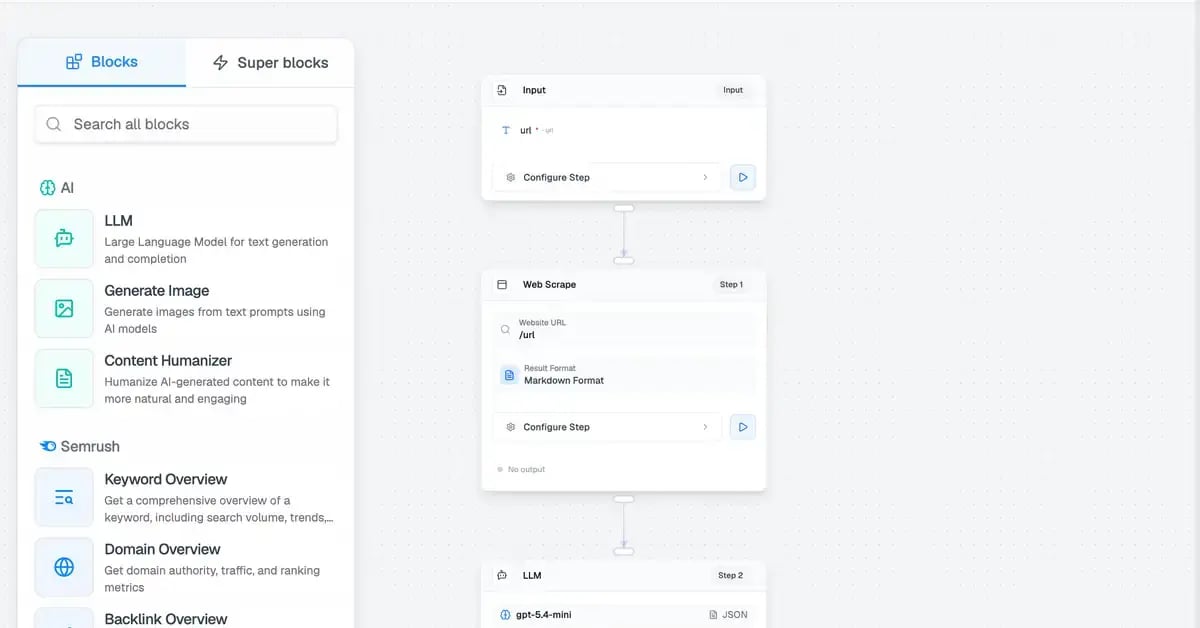
Sheets then run a workflow once per row. I loaded the 24 cited pages and attached a small scrape-and-extract workflow that returned each article's author, their profile page and the site's contact page. It works much like the grids in AirOps, and it is the part of the product I would use every week.
A credit model you can read
Credits are easy to reason about. On the Scale plan, $999 buys 50,000 credits[1], about two cents each, and our full content refresh used 519 of them, roughly $10. Researching outreach contacts for five agency lists used 74.
Compare that with what I found in my HubSpot AEO review. There, a single AI-generated draft costs about the same $10 in credits, but only after you pay for Marketing Hub Professional, which puts year one above $12,600 before the first draft exists. SlateHQ has no platform floor of that kind, and the $10 buys a refresh plan backed by its own research.
Integrations reach further than expected
The integrations page covers CRM, project management, communication and meeting tools, CMS publishing, an API with tokens, and support for adding remote MCP servers. I did not connect Slack during the trial, but alerts and approvals in a shared channel would suit an agency team well. One gap for us: HubSpot is offered as a CRM, not as a CMS, so HubSpot-hosted blogs cannot be published to directly.
Where SlateHQ falls short
It takes real effort to configure
The power comes with complexity. Building my first custom workflow took about half an hour of trial and error, mostly on variable syntax the interface does not explain. Only and worked, and the editor highlighted invalid variables as if they were fine. Testing a single step reuses cached data from earlier runs, and sheet rows can show "Completed" even when a step returned nothing, so failures are easy to miss.
None of this is unusual for a young automation product, but it shapes who should buy it. Scale and Agency plans include 1:1 expert onboarding[1], and I would treat that onboarding as essential. On the $499 Growth plan, which comes with live chat support, plan for your own setup time or paid help.
Rough edges in the data
The numbers do not always agree between screens. On the same day, the home screen reported a 37.5% brand mention rate, the AI Visibility overview 38%, and the Insights dashboard 45%. Each view seems to count a slightly different set of answers.
Directionally, though, the data was accurate. Generate More ranked at or near the top of its competitor set in every view, and the cited sources matched what I see in other trackers. Branded prompts drove most of our mentions, as they do elsewhere. My general view on AI visibility tools holds here: you are not looking for the most granular data, you are looking for the tool that helps you change the result.
What's missing: presence beyond your own site
SlateHQ's homepage promises to "Build your presence beyond your site" and describes a feature that finds contacts and drafts personalized outreach[2]. In my trial that part was not there yet. The citation-gap research and author identification worked well. Finding and verifying email addresses was not built in, and neither was sending. The agent reported that it had no contact-finding or email-verification tool to call.
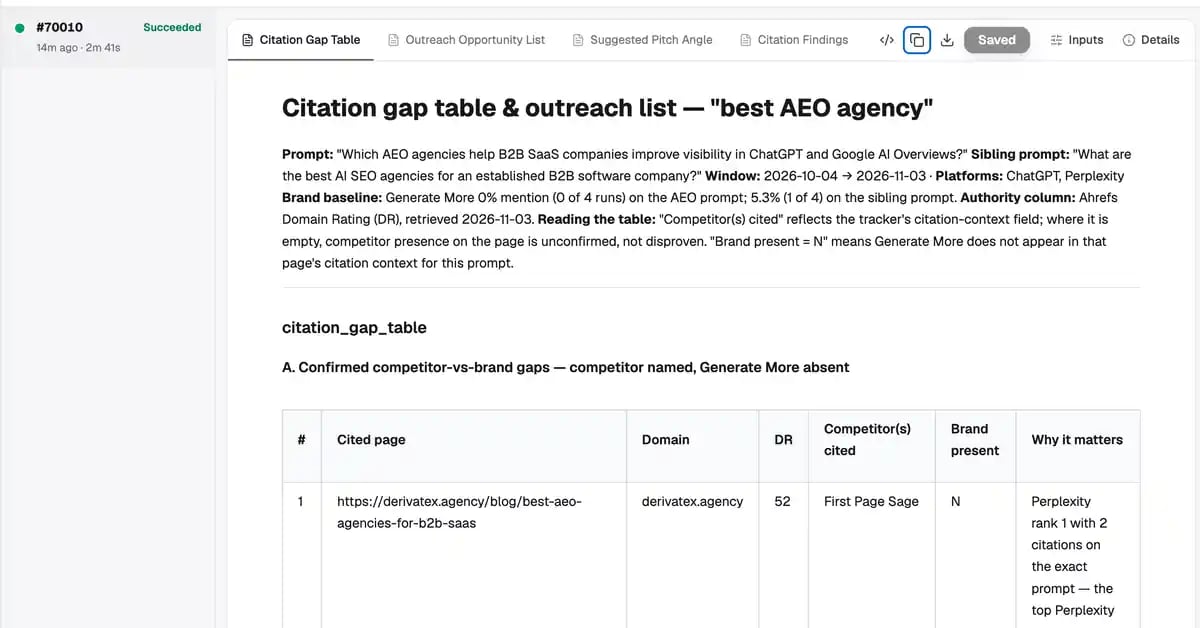
For brands chasing AI citations, third-party mentions matter as much as their own pages, so this is the release I would watch for.
SlateHQ vs AirOps vs Profound
AirOps and Profound are the two names SlateHQ will be compared with most often, and both have raised large rounds to serve big marketing teams. AirOps raised a $40M Series B led by Greylock to "help enterprise marketing teams scale their use of AI"[3]. Profound raised a $96M Series C at a $1 billion valuation and says it already works with more than 700 enterprise customers and 10% of the Fortune 500[4].
| SlateHQ | AirOps | Profound | |
|---|---|---|---|
| Core strength | Visibility tracking plus workflows, recipes and sheets | Content workflows and grids | Enterprise AI visibility analytics |
| Public pricing | $499, $999 and $2,000 a month | Solo and Pro start free, Enterprise through sales | Free trial, Enterprise custom |
| Onboarding | 1:1 on Scale and Agency | 1:1 on Enterprise | Dedicated support on Enterprise |
| Best fit | Agencies and lean in-house teams | Content teams scaling production | Large brands with security requirements |
Pricing as published by each vendor.[1][5][6]
AirOps still offers self-serve plans that start free, so the difference is less about access and more about where each company is putting its weight. SlateHQ's published prices and its dedicated Agency plan make it the easiest of the three to buy and resell as an agency.
SlateHQ alternatives
AirOps is the closest match if your main need is content production at scale. Its workflow and grid model is more mature, and the free self-serve start lowers the barrier to testing[5].
Profound fits large companies that need deep visibility analytics with SSO and SOC 2 compliance. Enterprise pricing is quoted through sales[6].
HubSpot AEO only makes sense if you already pay for Marketing Hub. I cover the costs in my HubSpot AEO review, along with lighter trackers such as Promptwatch, Peec AI, Superlines and Otterly for teams that only need measurement.
Who should use SlateHQ
SlateHQ suits agencies and in-house teams that have someone willing to own the setup. The Agency plan's workspaces let you run several client brands from one account, and the transparency of its reasoning makes the work easy to show a client. If all you need is a visibility score, cheaper trackers will do. If you want a system that turns visibility data into finished work, SlateHQ is worth the onboarding time.
What to expect next
SlateHQ is moving fast, and the off-site distribution and outreach features promised on its homepage are the obvious next step. If they arrive with the same transparency as the rest of the product, SlateHQ will cover the whole loop from measuring AI visibility to earning the mentions that change it.
Frequently asked questions
SlateHQ FAQ
How much does SlateHQ cost?
Growth costs $499 a month, Scale $999 and Agency $2,000, with custom Enterprise pricing and 20% off for annual billing[1].
Is SlateHQ the same as Slate?
Yes. The product is called Slate and lives at slatehq.com, so most people search for it as SlateHQ.
How do SlateHQ credits work?
Credits pay for agents, recipes, workflows and content generation. On the Scale plan they cost about two cents each, and in my trial a full content refresh used 519 credits.
Does SlateHQ include onboarding?
Scale and Agency include 1:1 expert onboarding and a dedicated account manager. Growth includes live chat support[1].
Can SlateHQ do outreach?
It can research which third-party pages AI engines cite and who wrote them. In my trial, finding verified emails and sending outreach were not available as built-in steps.
Is SlateHQ a good alternative to AirOps or Profound?
For agencies and lean teams, yes. It combines visibility tracking with an AirOps-style workflow layer at published prices. Large enterprises with strict security needs may still prefer Profound.
Sources
- SlateHQ, Pricing
- SlateHQ, Homepage
- Business Wire, AirOps raises $40M Series B
- Fortune, Profound raises $96 million
- AirOps, Pricing
- Profound, Pricing
Find out what AI says about you. A 30-minute call. I’ll have looked before we speak.

My Profound Review (2026): From AI Visibility Tracker to AI Marketer
My HubSpot AEO Review: What You Get and Alternatives in 2026